Back to Hub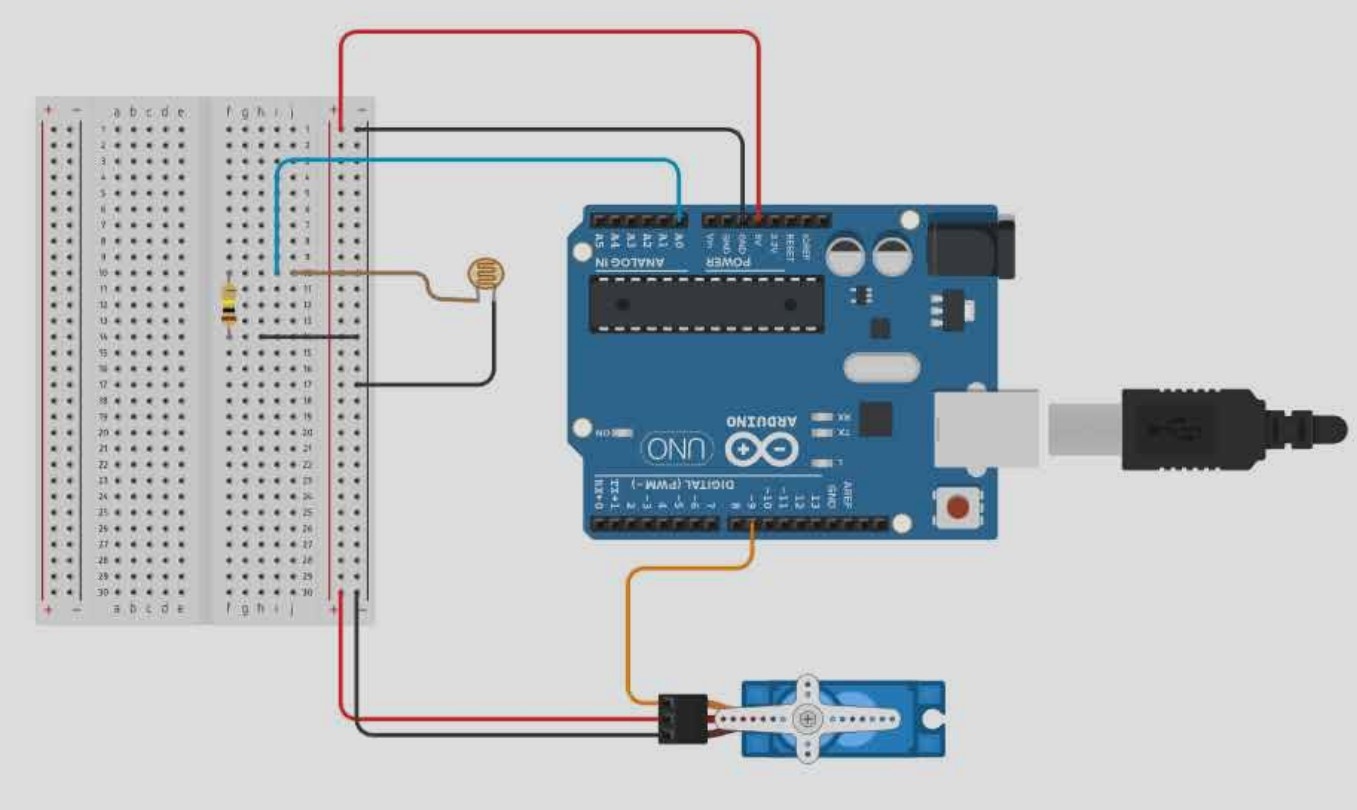
Arduino dinasour hack game
March 26, 2026 Watch Tutorial
Wiring Schematic
Hardware Required
- Arduino BoardBuy on Amazon
Source Code
Arduino / C++
1#include <Servo.h>
2
3Servo dinoServo;  // Create servo object to control the motor
4
5const int ldrPin = A0;    // The analog pin the LDR is connected to
6const int servoPin = 9;   // The PWM pin the servo is connected to
7
8// --- CALIBRATION VARIABLES ---
9int lightThreshold = 670;
10
11// TWEAK 1: Start closer to the key (55 instead of 30) for a faster physical punch
12int restAngle = 55;
13int pressAngle = 75;
14
15void setup() {
16  // TWEAK 2: Cranked baud rate to 115200 so your prints don't lag the motor
17  Serial.begin(115200);
18  dinoServo.attach(servoPin);
19
20  // Start the servo in the hovering position
21  dinoServo.write(restAngle);
22
23  Serial.println("Dino Hacker Online...");
24}
25
26void loop() {
27  // 1. Read the light level from the screen
28  int currentLight = analogRead(ldrPin);
29
30  // Print the value so you can see it on your computer screen
31  Serial.print("Light Level: ");
32  Serial.println(currentLight);
33
34  // 2. Check if a cactus is passing under the sensor (screen gets dark)
35  if (currentLight < lightThreshold) {
36    Serial.println("CACTUS DETECTED! JUMP!");
37
38    // Smash the spacebar
39    dinoServo.write(pressAngle);
40
41    // Wait just long enough for the key press to register, and the jump to happen
42    delay(50);
43
44    // Reset back to hovering position
45    dinoServo.write(restAngle);
46
47    // Wait a little bit so it doesn't double-jump on the same cactus
48    delay(35);
49  }
50
51  // TWEAK 3: Reduced this from 10 to 1 for ultra-fast screen scanning
52  delay(1);
53}