Back to Hub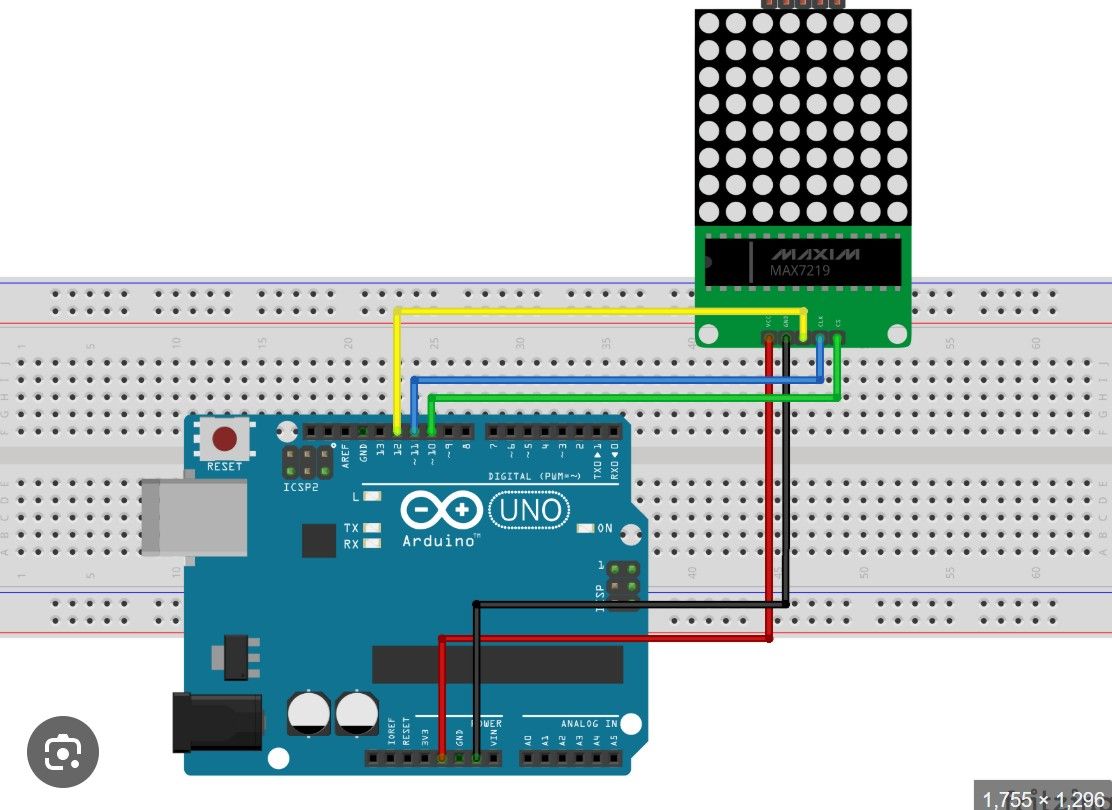
Finger controlled dot matrix
March 29, 2026 Watch Tutorial
Wiring Schematic
Hardware Required
- Arduino BoardBuy on Amazon
Source Code
Arduino / C++
1#include <LedControl.h>
2
3// DIN, CLK, CS, only ONE dot matrix
4LedControl lc = LedControl(11, 13, 10, 1);
5
6byte numbers[10][8] = {
7  {B00111100,B01100110,B01100110,B01100110,B01100110,B01100110,B00111100,B00000000}, //0
8  {B00011000,B00111000,B00011000,B00011000,B00011000,B00011000,B00111100,B00000000}, //1
9  {B00111100,B01100110,B00000110,B00001100,B00110000,B01100000,B01111110,B00000000}, //2
10  {B00111100,B01100110,B00000110,B00011100,B00000110,B01100110,B00111100,B00000000}, //3
11  {B00001100,B00011100,B00101100,B01001100,B01111110,B00001100,B00001100,B00000000}, //4
12  {B01111110,B01100000,B01111100,B00000110,B00000110,B01100110,B00111100,B00000000}, //5
13  {B00111100,B01100000,B01111100,B01100110,B01100110,B01100110,B00111100,B00000000}, //6
14  {B01111110,B00000110,B00001100,B00011000,B00110000,B00110000,B00110000,B00000000}, //7
15  {B00111100,B01100110,B01100110,B00111100,B01100110,B01100110,B00111100,B00000000}, //8
16  {B00111100,B01100110,B01100110,B00111110,B00000110,B00001100,B00111000,B00000000}  //9
17};
18
19void showNumber(int n) {
20  lc.clearDisplay(0);
21  for (int i = 0; i < 8; i++) {
22    lc.setRow(0, i, numbers[n][i]);
23  }
24}
25
26void setup() {
27  Serial.begin(9600);
28
29  lc.shutdown(0, false);
30  lc.setIntensity(0, 3);   // 🔆 LOW BRIGHTNESS (0–15)
31  lc.clearDisplay(0);
32
33  // startup test
34  showNumber(8);
35}
36
37void loop() {
38  if (Serial.available()) {
39    char ch = Serial.read();
40
41    if (ch >= '0' && ch <= '9') {
42      showNumber(ch - '0');
43    }
44  }
45}
46
47
48
49
50
51
52
53// Python code
54
55
56
57import cv2
58import mediapipe as mp
59import serial
60import time
61
62# Arduino COM port (change it)
63arduino = serial.Serial('COM3', 9600)
64time.sleep(2)
65
66mp_hands = mp.solutions.hands
67hands = mp_hands.Hands()
68mp_draw = mp.solutions.drawing_utils
69
70cap = cv2.VideoCapture(0)
71
72def count_fingers(hand_landmarks):
73    tips = [4, 8, 12, 16, 20]
74    fingers = []
75
76    # Thumb
77    if hand_landmarks.landmark[tips[0]].x < hand_landmarks.landmark[tips[0] - 1].x:
78        fingers.append(1)
79    else:
80        fingers.append(0)
81
82    # Other fingers
83    for i in range(1, 5):
84        if hand_landmarks.landmark[tips[i]].y < hand_landmarks.landmark[tips[i] - 2].y:
85            fingers.append(1)
86        else:
87            fingers.append(0)
88
89    return sum(fingers)
90
91while True:
92    success, img = cap.read()
93    imgRGB = cv2.cvtColor(img, cv2.COLOR_BGR2RGB)
94    results = hands.process(imgRGB)
95
96    if results.multi_hand_landmarks:
97        for handLms in results.multi_hand_landmarks:
98            count = count_fingers(handLms)
99            print("Fingers:", count)
100
101            # Send to Arduino
102            arduino.write(str(count).encode())
103
104            mp_draw.draw_landmarks(img, handLms, mp_hands.HAND_CONNECTIONS)
105
106    cv2.imshow("Hand Tracking", img)
107
108    if cv2.waitKey(1) & 0xFF == 27:
109        break
110
111cap.release()
112cv2.destroyAllWindows()