Back to Hub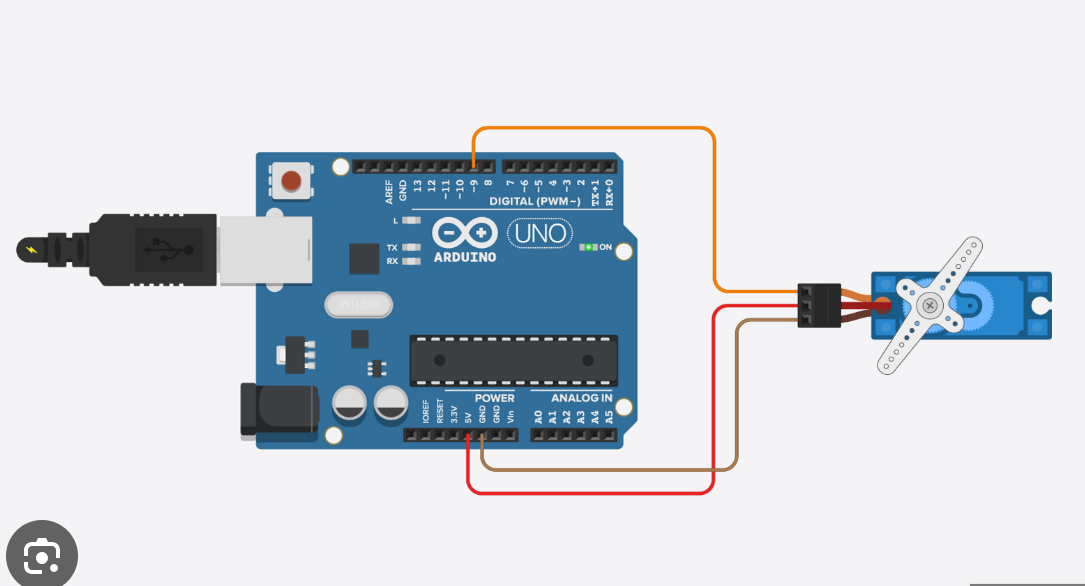
finger controlled Servo motor
March 30, 2026 Watch Tutorial
Wiring Schematic
Hardware Required
- Arduino BoardBuy on Amazon
Source Code
Arduino / C++
1#include <Servo.h>
2
3Servo myServo;
4int angle = 0;
5
6void setup() {
7  Serial.begin(9600);
8  myServo.attach(9);  // Servo signal pin
9}
10
11void loop() {
12  if (Serial.available() > 0) {
13    angle = Serial.parseInt();
14    if (angle >= 0 && angle <= 180) {
15      myServo.write(angle);
16    }
17  }
18}
19
20
21
22
23
24
25
26
27
28
29
30// Python code
31
32
33
34
35
36
37
38import cv2
39import mediapipe as mp
40import serial
41import time
42import math
43
44# Change COM port (check in Arduino IDE)
45arduino = serial.Serial('COM3', 9600)
46time.sleep(2)
47
48mp_hands = mp.solutions.hands
49hands = mp_hands.Hands()
50mp_draw = mp.solutions.drawing_utils
51
52cap = cv2.VideoCapture(0)
53
54def map_range(value, in_min, in_max, out_min, out_max):
55    return int((value - in_min) * (out_max - out_min) / (in_max - in_min) + out_min)
56
57while True:
58    success, img = cap.read()
59    imgRGB = cv2.cvtColor(img, cv2.COLOR_BGR2RGB)
60    results = hands.process(imgRGB)
61
62    if results.multi_hand_landmarks:
63        for handLms in results.multi_hand_landmarks:
64            lmList = []
65            h, w, c = img.shape
66
67            for id, lm in enumerate(handLms.landmark):
68                cx, cy = int(lm.x * w), int(lm.y * h)
69                lmList.append((cx, cy))
70
71            # Thumb tip (4) & Index tip (8)
72            x1, y1 = lmList[4]
73            x2, y2 = lmList[8]
74
75            # Distance
76            length = math.hypot(x2 - x1, y2 - y1)
77
78            # Map distance to servo angle
79            angle = map_range(length, 20, 200, 0, 180)
80            angle = max(0, min(180, angle))
81
82            # Send to Arduino
83            arduino.write(f"{angle}\n".encode())
84
85            # Draw
86            cv2.circle(img, (x1, y1), 10, (255, 0, 255), cv2.FILLED)
87            cv2.circle(img, (x2, y2), 10, (255, 0, 255), cv2.FILLED)
88            cv2.line(img, (x1, y1), (x2, y2), (255, 0, 255), 3)
89
90            cv2.putText(img, str(angle), (50, 100),
91                        cv2.FONT_HERSHEY_SIMPLEX, 2, (0, 255, 0), 3)
92
93            mp_draw.draw_landmarks(img, handLms, mp_hands.HAND_CONNECTIONS)
94
95    cv2.imshow("Gesture Control", img)
96    if cv2.waitKey(1) & 0xFF == 27:
97        break
98
99cap.release()
100cv2.destroyAllWindows()