Back to Hub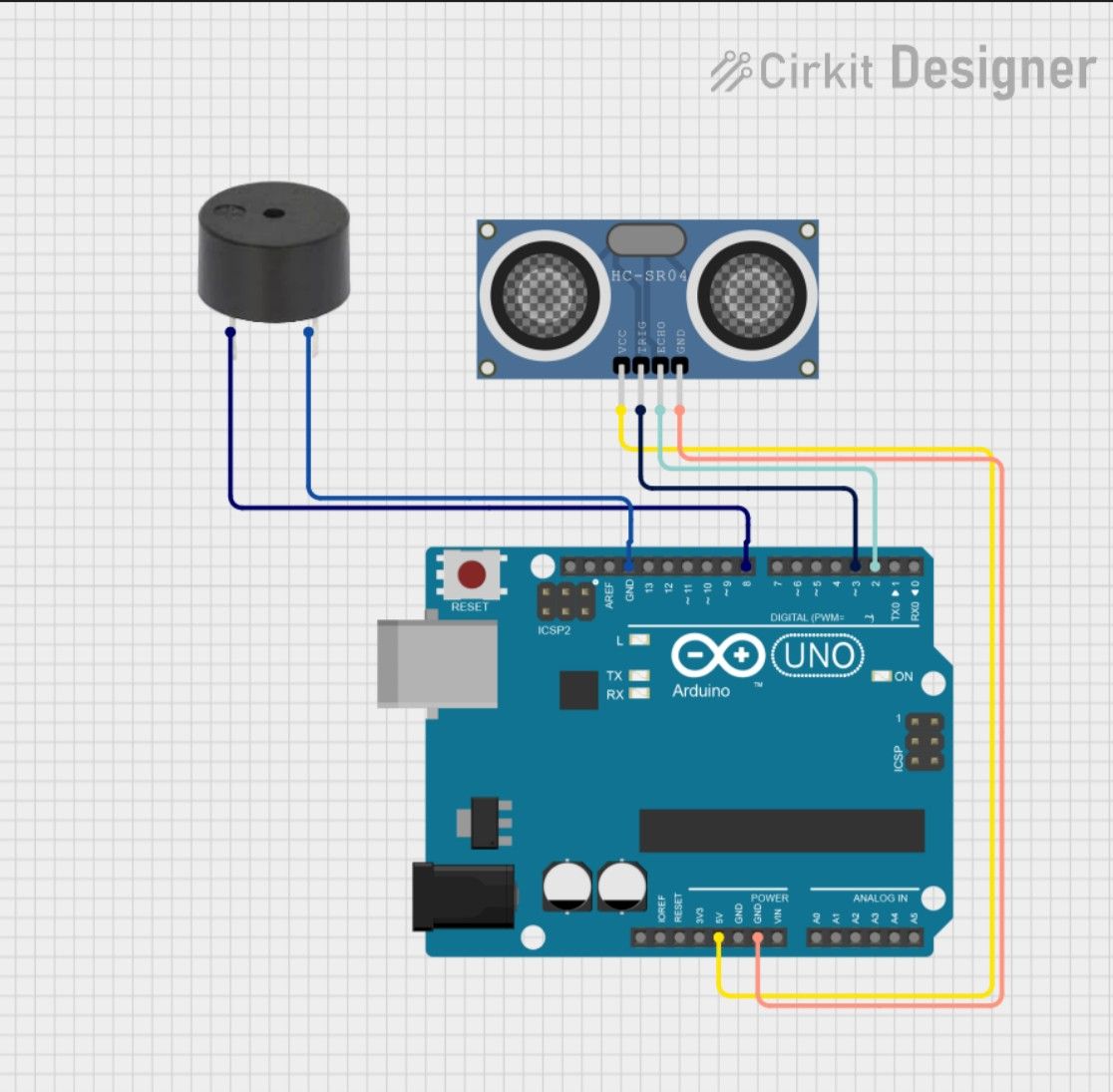
Object detection system with Arduino
April 2, 2026 Watch Tutorial
Wiring Schematic
Hardware Required
- Arduino BoardBuy on Amazon
Source Code
Arduino / C++
1// Define Pins
2const int trigPin = 3;
3const int echoPin = 2;
4const int buzzerPin = 8;
5
6// Variables
7long duration;
8int distance;
9
10void setup() {
11  pinMode(trigPin, OUTPUT); // Sets the trigPin as an Output
12  pinMode(echoPin, INPUT);  // Sets the echoPin as an Input
13  pinMode(buzzerPin, OUTPUT); // Sets the buzzer as an Output
14
15  Serial.begin(9600); // For debugging in the Serial Monitor
16}
17
18void loop() {
19  // Clear the trigPin
20  digitalWrite(trigPin, LOW);
21  delayMicroseconds(2);
22
23  // Trigger the sensor by sending a 10 microsecond pulse
24  digitalWrite(trigPin, HIGH);
25  delayMicroseconds(10);
26  digitalWrite(trigPin, LOW);
27
28  // Read the echoPin, returns the sound wave travel time in microseconds
29  duration = pulseIn(echoPin, HIGH);
30
31  // Calculating the distance
32  distance = duration * 0.034 / 2;
33
34  // Print distance to Serial Monitor (optional)
35  Serial.print("Distance: ");
36  Serial.print(distance);
37  Serial.println(" cm");
38
39  // Check the 20cm threshold
40  if (distance <= 20 && distance > 0) {
41    digitalWrite(buzzerPin, HIGH); // Turn buzzer ON
42  } else {
43    digitalWrite(buzzerPin, LOW);  // Turn buzzer OFF
44  }
45
46  delay(100); // Small delay for stability
47}