Back to Hub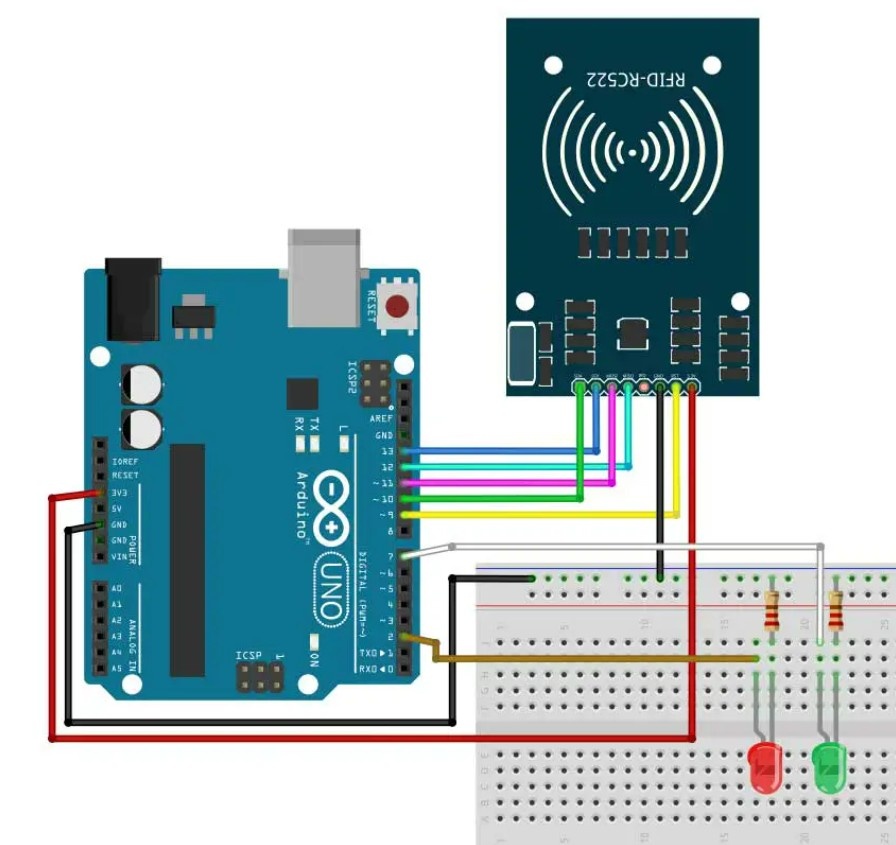
RFID Card sensor project
April 3, 2026 Watch Tutorial
Wiring Schematic
Hardware Required
- Arduino BoardBuy on Amazon
Source Code
Arduino / C++
1#include <SPI.h>
2#include <MFRC522.h>
3
4// Define RFID Pins
5#define RST_PIN 9
6#define SS_PIN 10
7
8// Define Component Pins
9#define RED_LED 4
10#define GREEN_LED 5
11#define BUZZER 6
12
13// Create MFRC522 instance
14MFRC522 mfrc522(SS_PIN, RST_PIN);
15
16// REPLACE THESE WITH YOUR ACTUAL UIDs (Format: "XX XX XX XX")
17String cardUID = "AA BB CC DD";     // The UID that triggers the RED LED
18String keychainUID = "11 22 33 44"; // The UID that triggers the GREEN LED
19
20void setup() {
21  Serial.begin(9600); // Initialize serial communications
22  SPI.begin();        // Initialize SPI bus
23  mfrc522.PCD_Init(); // Initialize RC522 module
24
25  // Set pin modes
26  pinMode(RED_LED, OUTPUT);
27  pinMode(GREEN_LED, OUTPUT);
28  pinMode(BUZZER, OUTPUT);
29
30  Serial.println("System Ready. Scan your RFID tag...");
31}
32
33void loop() {
34  // Look for new cards
35  if (!mfrc522.PICC_IsNewCardPresent()) {
36    return;
37  }
38  // Select one of the cards
39  if (!mfrc522.PICC_ReadCardSerial()) {
40    return;
41  }
42
43  // Read the scanned UID
44  String scannedUID = "";
45  for (byte i = 0; i < mfrc522.uid.size; i++) {
46    scannedUID.concat(String(mfrc522.uid.uidByte[i] < 0x10 ? " 0" : " "));
47    scannedUID.concat(String(mfrc522.uid.uidByte[i], HEX));
48  }
49  scannedUID.toUpperCase();
50  scannedUID = scannedUID.substring(1); // Remove the leading space
51
52  Serial.print("Scanned UID: ");
53  Serial.println(scannedUID);
54
55  // LOGIC: Check which tag was scanned
56  if (scannedUID == cardUID) {
57    // Card Scanned -> Red LED & Angry Buzz
58    Serial.println("Card Scanned - Access Denied!");
59    digitalWrite(RED_LED, HIGH);
60
61    // Low, long error buzz
62    tone(BUZZER, 300, 1000);
63    delay(1000);
64
65    digitalWrite(RED_LED, LOW);
66
67  } else if (scannedUID == keychainUID) {
68    // Keychain Scanned -> Green LED & Welcome Melody
69    Serial.println("Keychain Scanned - Welcome!");
70    digitalWrite(GREEN_LED, HIGH);
71
72    // Happy welcome melody (rising tones)
73    tone(BUZZER, 1000, 150);
74    delay(200);
75    tone(BUZZER, 1500, 150);
76    delay(200);
77    tone(BUZZER, 2000, 300);
78    delay(400);
79
80    digitalWrite(GREEN_LED, LOW);
81
82  } else {
83    // Unrecognized tag
84    Serial.println("Unknown Tag Scanned.");
85    // Optional: Add a short blip for unknown tags
86    tone(BUZZER, 500, 100);
87    delay(100);
88  }
89
90  // Halt PICC to stop reading the same card multiple times instantly
91  mfrc522.PICC_HaltA();
92}