Back to Hub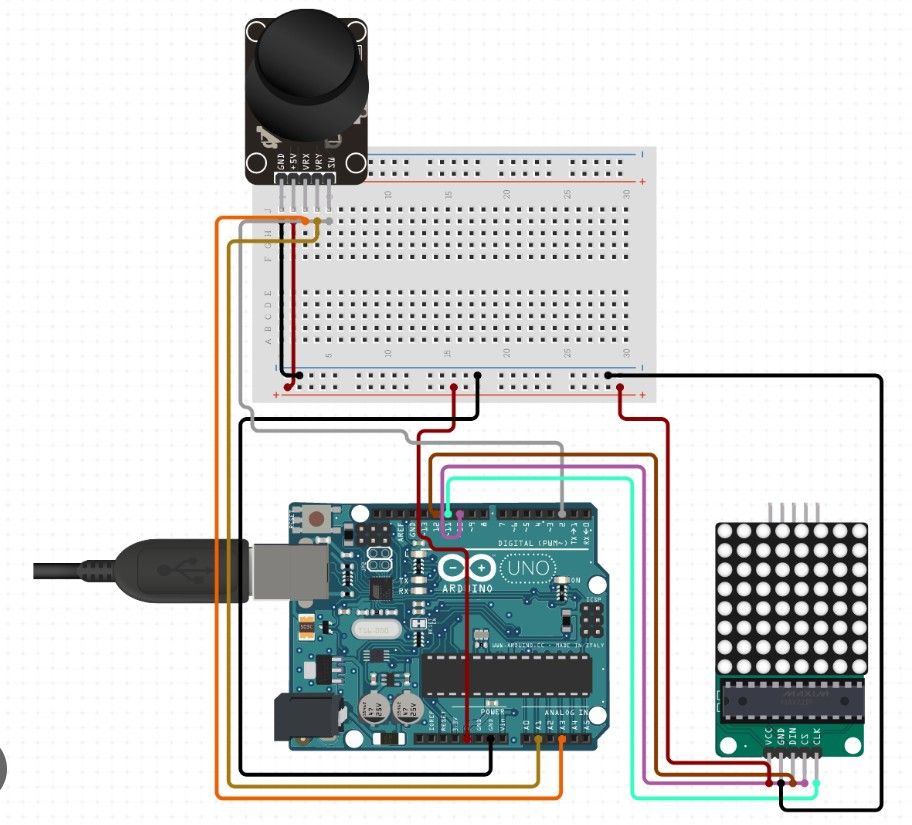
Snake game arduino
April 5, 2026 Watch Tutorial
Wiring Schematic
Hardware Required
- Arduino BoardBuy on Amazon
Source Code
Arduino / C++
1// ==================================================
2// ADITYA INVENTS - ARDUINO DOT MATRIX SNAKE GAME
3// HARDWARE: Arduino, MAX7219 8x8 Dot Matrix, Joystick
4// ==================================================
5
6#include <LedControl.h>
7
8// --- YOUR CUSTOM PIN CONFIGURATION ---
9#define DIN_PIN 12
10#define CLK_PIN 11
11#define CS_PIN 10
12#define VRY_PIN A1
13#define VRX_PIN A3
14
15// Initialize LedControl for 1 module
16LedControl lc = LedControl(DIN_PIN, CLK_PIN, CS_PIN, 1);
17
18// --- GAME VARIABLES ---
19int snakeX[64]; // Max length of snake on 8x8 is 64
20int snakeY[64];
21int snakeLength = 3;
22
23int foodX;
24int foodY;
25
26// Directions: 0=Up, 1=Right, 2=Down, 3=Left
27int currentDir = 1;
28
29unsigned long lastMoveTime = 0;
30int gameSpeed = 300; // Lower is faster (milliseconds)
31bool gameOver = false;
32
33// --- ARDUINO JOYSTICK THRESHOLDS ---
34// Standard Arduino Analog is 0-1023. Center is roughly 512.
35const int JOY_CENTER = 512;
36const int JOY_DEADZONE = 150;
37
38void setup() {
39  Serial.begin(9600);
40
41  // Initialize Dot Matrix
42  lc.shutdown(0, false); // Wake up MAX7219
43  lc.setIntensity(0, 8); // Set brightness (0-15)
44  lc.clearDisplay(0);    // Clear screen
45
46  // Random seed using an unconnected analog pin for true randomness
47  randomSeed(analogRead(A0));
48
49  resetGame();
50}
51
52void loop() {
53  if (gameOver) {
54    playGameOverAnimation();
55    resetGame();
56    return;
57  }
58
59  handleJoystick();
60
61  // Move the snake based on gameSpeed timer
62  if (millis() - lastMoveTime > gameSpeed) {
63    moveSnake();
64    checkCollisions();
65    drawGame();
66    lastMoveTime = millis();
67  }
68}
69
70// ==================================================
71// 1. GAME LOGIC
72// ==================================================
73
74void resetGame() {
75  snakeLength = 3;
76
77  // Starting position in the middle
78  snakeX[0] = 3; snakeY[0] = 4; // Head
79  snakeX[1] = 2; snakeY[1] = 4; // Body
80  snakeX[2] = 1; snakeY[2] = 4; // Tail
81
82  currentDir = 1; // Start moving Right
83  gameSpeed = 300; // Reset speed
84  gameOver = false;
85
86  spawnFood();
87  lc.clearDisplay(0);
88}
89
90void spawnFood() {
91  bool validPos = false;
92  while (!validPos) {
93    foodX = random(0, 8);
94    foodY = random(0, 8);
95    validPos = true;
96
97    // Check if food spawned ON the snake
98    for (int i = 0; i < snakeLength; i++) {
99      if (foodX == snakeX[i] && foodY == snakeY[i]) {
100        validPos = false;
101        break;
102      }
103    }
104  }
105}
106
107void moveSnake() {
108  // Shift body coordinates
109  for (int i = snakeLength - 1; i > 0; i--) {
110    snakeX[i] = snakeX[i - 1];
111    snakeY[i] = snakeY[i - 1];
112  }
113
114  // Move Head based on direction
115  if (currentDir == 0) snakeY[0]--;      // Up
116  else if (currentDir == 1) snakeX[0]++; // Right
117  else if (currentDir == 2) snakeY[0]++; // Down
118  else if (currentDir == 3) snakeX[0]--; // Left
119}
120
121void checkCollisions() {
122  // 1. Wall Collision
123  if (snakeX[0] < 0 || snakeX[0] > 7 || snakeY[0] < 0 || snakeY[0] > 7) {
124    gameOver = true;
125  }
126
127  // 2. Self Collision (Start checking from index 1 to ignore head)
128  for (int i = 1; i < snakeLength; i++) {
129    if (snakeX[0] == snakeX[i] && snakeY[0] == snakeY[i]) {
130      gameOver = true;
131    }
132  }
133
134  // 3. Food Collision
135  if (snakeX[0] == foodX && snakeY[0] == foodY) {
136    snakeLength++; // Grow
137    spawnFood();   // New apple
138
139    // Speed up slightly every time you eat, capping at 80ms max speed
140    if (gameSpeed > 80) {
141      gameSpeed -= 15;
142    }
143  }
144}
145
146// ==================================================
147// 2. CONTROLS & GRAPHICS
148// ==================================================
149
150void handleJoystick() {
151  int xVal = analogRead(VRX_PIN);
152  int yVal = analogRead(VRY_PIN);
153
154  // Note: Depending on how you hold your joystick, you might need
155  // to swap xVal/yVal or the `<` / `>` operators.
156
157  if (yVal < (JOY_CENTER - JOY_DEADZONE) && currentDir != 2) {
158    currentDir = 0; // UP
159  }
160  else if (yVal > (JOY_CENTER + JOY_DEADZONE) && currentDir != 0) {
161    currentDir = 2; // DOWN
162  }
163  else if (xVal > (JOY_CENTER + JOY_DEADZONE) && currentDir != 3) {
164    currentDir = 1; // RIGHT
165  }
166  else if (xVal < (JOY_CENTER - JOY_DEADZONE) && currentDir != 1) {
167    currentDir = 3; // LEFT
168  }
169}
170
171void drawGame() {
172  lc.clearDisplay(0);
173
174  // Draw Food
175  lc.setLed(0, foodY, foodX, true);
176
177  // Draw Snake
178  for (int i = 0; i < snakeLength; i++) {
179    // Only draw if inside matrix bounds to prevent graphical glitches
180    if(snakeX[i] >= 0 && snakeX[i] <= 7 && snakeY[i] >= 0 && snakeY[i] <= 7) {
181      lc.setLed(0, snakeY[i], snakeX[i], true);
182    }
183  }
184}
185
186void playGameOverAnimation() {
187  // Flash the screen 3 times
188  for (int j = 0; j < 3; j++) {
189    for (int r = 0; r < 8; r++) {
190      lc.setRow(0, r, B11111111); // All LEDs ON
191    }
192    delay(300);
193    lc.clearDisplay(0);
194    delay(300);
195  }
196  delay(1000); // Wait 1 second before restarting
197}