Back to Hub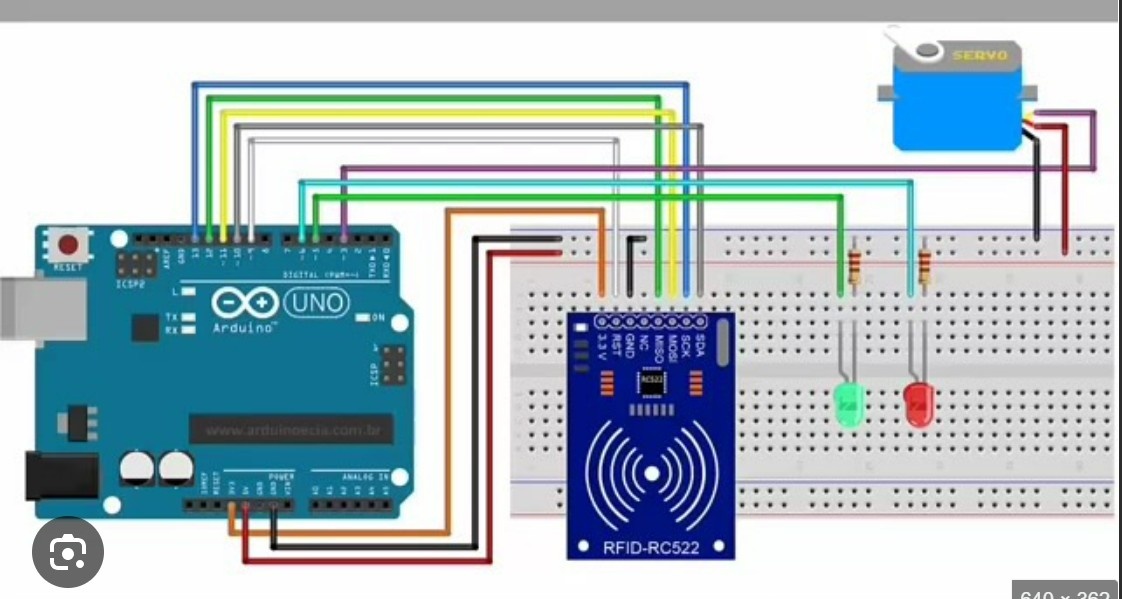
RFID Card sensor with servo
April 9, 2026 Watch Tutorial
Wiring Schematic
Hardware Required
- Arduino BoardBuy on Amazon
Source Code
Arduino / C++
1/* * ==========================================================
2 * Project: Smart RFID Security System with Audio/Visual Alerts
3 * Brought to you by: Aditya Invents
4 * * Description: Scans an RFID tag. If authorized, it plays a
5 * welcome melody, flashes green, and opens a servo lock.
6 * If unauthorized, it sounds a harsh alarm and flashes red.
7 * * NOTE: This wiring is designed for the Arduino Uno!
8 * ==========================================================
9 */
10
11#include <SPI.h>
12#include <MFRC522.h>
13#include <Servo.h>
14
15// 1. Define Pins for Arduino Uno
16#define RST_PIN   5     // Reset pin for RFID
17#define SS_PIN    10    // SDA/SS pin for RFID on Uno
18#define GREEN_LED 6     // Authorized LED
19#define RED_LED   7     // Denied LED
20#define BUZZER    8     // Audio feedback
21#define SERVO_PIN 9     // Lock mechanism
22
23// 2. Initialize Objects
24MFRC522 rfid(SS_PIN, RST_PIN); // Create the RFID instance
25Servo lockServo;               // Create the Servo instance
26
27// 3. SET YOUR MASTER KEYCHAIN UID HERE!
28// Replace these 4 values with the UID of your specific tag.
29// You can find your tag's UID by watching the Serial Monitor.
30byte authorizedUID[4] = {0xDE, 0xAD, 0xBE, 0xEF};
31
32void setup() {
33  // Start serial communication for debugging
34  Serial.begin(9600);
35
36  // Initialize the SPI bus and the RFID module
37  SPI.begin();
38  rfid.PCD_Init();
39
40  // Setup output pins
41  pinMode(GREEN_LED, OUTPUT);
42  pinMode(RED_LED, OUTPUT);
43  pinMode(BUZZER, OUTPUT);
44
45  // Attach the servo and set it to the "Locked" position (0 degrees)
46  lockServo.attach(SERVO_PIN);
47  lockServo.write(0);
48
49  // Ensure LEDs and Buzzer are off at startup
50  digitalWrite(GREEN_LED, LOW);
51  digitalWrite(RED_LED, LOW);
52  noTone(BUZZER);
53
54  Serial.println("System Initialized.");
55  Serial.println("Waiting for an RFID Card/Keychain...");
56}
57
58void loop() {
59  // 1. Look for new cards. If none, restart the loop.
60  if (!rfid.PICC_IsNewCardPresent()) {
61    return;
62  }
63
64  // 2. Select one of the cards. If it fails, restart the loop.
65  if (!rfid.PICC_ReadCardSerial()) {
66    return;
67  }
68
69  // Print the UID of the scanned card to the Serial Monitor
70  Serial.print("Tag Scanned UID:");
71  for (byte i = 0; i < rfid.uid.size; i++) {
72    Serial.print(rfid.uid.uidByte[i] < 0x10 ? " 0" : " ");
73    Serial.print(rfid.uid.uidByte[i], HEX);
74  }
75  Serial.println();
76
77  // 3. Check if the scanned card matches our authorized keychain
78  bool isAuthorized = true;
79  for (byte i = 0; i < 4; i++) {
80    if (rfid.uid.uidByte[i] != authorizedUID[i]) {
81      isAuthorized = false; // A mismatch was found!
82      break;
83    }
84  }
85
86  // 4. Trigger the appropriate action based on the check
87  if (isAuthorized) {
88    Serial.println("Access Granted! Welcome.");
89    accessGranted();
90  } else {
91    Serial.println("Access Denied! Intruder Alert.");
92    accessDenied();
93  }
94
95  // 5. Halt reading the current card to prevent rapid-fire scanning
96  rfid.PICC_HaltA();
97}
98
99/* * Function: accessGranted
100 * Action: Turns on Green LED, plays a happy tune, opens the lock,
101 * waits 3 seconds, and then relocks the system.
102 */
103void accessGranted() {
104  digitalWrite(GREEN_LED, HIGH); // Green light ON
105
106  // Play a quick, ascending "Welcome" melody
107  tone(BUZZER, 1000); // 1000 Hz tone
108  delay(100);
109  tone(BUZZER, 1500); // 1500 Hz tone
110  delay(100);
111  tone(BUZZER, 2000); // 2000 Hz tone
112  delay(200);
113  noTone(BUZZER);     // Stop buzzer
114
115  // Open the door (Move servo to 90 degrees)
116  lockServo.write(90);
117
118  // Keep the door open for 3 seconds
119  delay(3000);
120
121  // Reset the system to locked state
122  lockServo.write(0);           // Close door
123  digitalWrite(GREEN_LED, LOW); // Green light OFF
124}
125
126/* * Function: accessDenied
127 * Action: Flashes the Red LED and plays a harsh, repeating alarm.
128 * The door servo remains locked.
129 */
130void accessDenied() {
131  // Flash red light and buzz 3 times quickly
132  for (int i = 0; i < 3; i++) {
133    digitalWrite(RED_LED, HIGH);
134    tone(BUZZER, 300); // A low, harsh 300 Hz tone
135    delay(200);
136
137    digitalWrite(RED_LED, LOW);
138    noTone(BUZZER);
139    delay(100);
140  }
141}