Back to Hub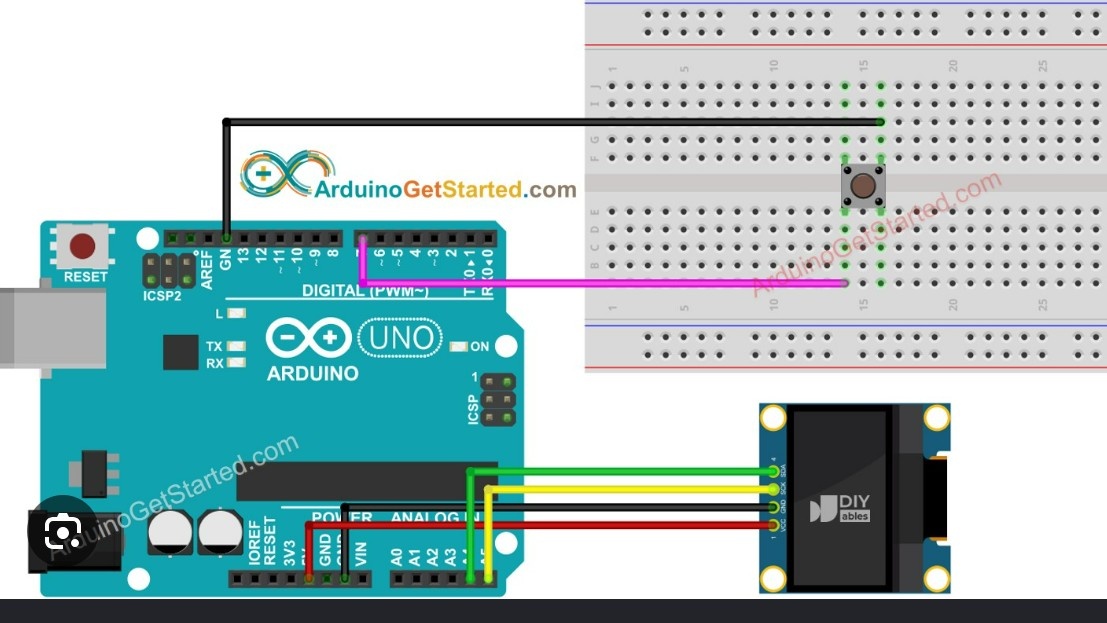
Dinosaur game on oled dipslay
May 15, 2026 Watch Tutorial
Wiring Schematic
Hardware Required
- Arduino Board
- Breadbaord
Source Code
Arduino / C++
1#include <Wire.h>
2#include <Adafruit_GFX.h>
3#include <Adafruit_SSD1306.h>
4
5#define SCREEN_WIDTH 128
6#define SCREEN_HEIGHT 64
7#define OLED_RESET -1
8#define SCREEN_ADDRESS 0x3C
9#define BUTTON_PIN 7
10
11Adafruit_SSD1306 display(SCREEN_WIDTH, SCREEN_HEIGHT, &Wire, OLED_RESET);
12
13// --- HIGH QUALITY ANIMATED SPRITES (16x16) ---
14const unsigned char PROGMEM dino_run1[] = {
15  0x01, 0xfe, 0x01, 0xfe, 0x01, 0xfe, 0x01, 0xfe, 0x01, 0xf8, 0x03, 0xf0, 0x3f, 0xe0, 0x7f, 0xe0,
16  0xff, 0xe0, 0xff, 0xe0, 0x7f, 0xc0, 0x3f, 0x80, 0x1e, 0x00, 0x18, 0x00, 0x10, 0x00, 0x10, 0x00
17};
18
19const unsigned char PROGMEM dino_run2[] = {
20  0x01, 0xfe, 0x01, 0xfe, 0x01, 0xfe, 0x01, 0xfe, 0x01, 0xf8, 0x03, 0xf0, 0x3f, 0xe0, 0x7f, 0xe0,
21  0xff, 0xe0, 0xff, 0xe0, 0x7f, 0xc0, 0x3f, 0x80, 0x1a, 0x00, 0x0a, 0x00, 0x02, 0x00, 0x02, 0x00
22};
23
24const unsigned char PROGMEM cactus_sprite[] = {
25  0x00, 0x00, 0x00, 0x00, 0x02, 0x00, 0x03, 0x00, 0x23, 0x00, 0x33, 0x00, 0x33, 0x18, 0x3b, 0x38,
26  0x3f, 0x38, 0x3f, 0x38, 0x1f, 0xf8, 0x0f, 0xf0, 0x07, 0x00, 0x07, 0x00, 0x07, 0x00, 0x07, 0x00
27};
28
29// --- SMOOTH PHYSICS VARIABLES ---
30float dinoY = 48;
31float velocityY = 0;
32float gravity = 1.3;
33float jumpPower = -9.5;
34bool isGrounded = true;
35
36// --- OBSTACLE VARIABLES ---
37float cactusX = 128;
38float cactusSpeed = 4.0;
39int obstacleType = 1;  // 1 = Single Cactus, 2 = Double Cactus
40int cactusWidth = 16;  // Automatically updates based on single or double
41
42int score = 0;
43bool gameOver = false;
44bool useFrame1 = true;
45
46// Timing variables
47unsigned long previousMillis = 0;
48const long animationInterval = 100;
49bool lastButtonState = HIGH;
50
51void setup() {
52  pinMode(BUTTON_PIN, INPUT_PULLUP);
53
54  // Random seed based on unconnected analog pin to make true random obstacles
55  randomSeed(analogRead(0));
56
57  if(!display.begin(SSD1306_SWITCHCAPVCC, SCREEN_ADDRESS)) {
58    for(;;);
59  }
60  display.clearDisplay();
61  showIntro();
62}
63
64void loop() {
65  if (gameOver) {
66    showGameOver();
67    if (digitalRead(BUTTON_PIN) == LOW) {
68      resetGame();
69      delay(300);
70    }
71    return;
72  }
73
74  // 1. Check Input
75  bool currentButtonState = digitalRead(BUTTON_PIN);
76  if (currentButtonState == LOW && lastButtonState == HIGH && isGrounded) {
77    velocityY = jumpPower;
78    isGrounded = false;
79  }
80  lastButtonState = currentButtonState;
81
82  // 2. Calculate Smooth Physics
83  velocityY += gravity;
84  dinoY += velocityY;
85
86  // Floor Collision
87  if (dinoY >= 48) {
88    dinoY = 48;
89    velocityY = 0;
90    isGrounded = true;
91  }
92
93  // 3. Move Cactus & Increase Difficulty
94  cactusX -= cactusSpeed;
95
96  // When obstacle goes fully off screen
97  if (cactusX < -cactusWidth) {
98    cactusX = 128;
99    score++;
100
101    // Smoothly increase game speed
102    if (score % 5 == 0 && cactusSpeed < 8.0) {
103      cactusSpeed += 0.5;
104    }
105
106    // Randomize next obstacle (1 or 2 cacti)
107    obstacleType = random(1, 3); // Picks 1 or 2
108
109    // Calculate new width: Single = 16px, Double = 28px
110    if (obstacleType == 1) {
111      cactusWidth = 16;
112    } else {
113      cactusWidth = 28; // Two cacti overlapped slightly
114    }
115  }
116
117  // 4. Pixel-Perfect Dynamic Collision Detection
118  int hitMargin = 3;
119  if (10 + hitMargin < cactusX + cactusWidth - hitMargin &&
120      10 + 16 - hitMargin > cactusX + hitMargin &&
121      (int)dinoY + hitMargin < 48 + 16 - hitMargin &&
122      (int)dinoY + 16 - hitMargin > 48 + hitMargin) {
123    gameOver = true;
124  }
125
126  // 5. Animate Legs
127  unsigned long currentMillis = millis();
128  if (currentMillis - previousMillis >= animationInterval) {
129    previousMillis = currentMillis;
130    useFrame1 = !useFrame1;
131  }
132
133  // 6. Draw Everything
134  display.clearDisplay();
135
136  // Draw Ground
137  display.drawLine(0, 63, 128, 63, SSD1306_WHITE);
138
139  // Draw Dino
140  if (!isGrounded) {
141    display.drawBitmap(10, (int)dinoY, dino_run1, 16, 16, SSD1306_WHITE);
142  } else if (useFrame1) {
143    display.drawBitmap(10, (int)dinoY, dino_run1, 16, 16, SSD1306_WHITE);
144  } else {
145    display.drawBitmap(10, (int)dinoY, dino_run2, 16, 16, SSD1306_WHITE);
146  }
147
148  // Draw Obstacles (Loops to draw either 1 or 2 cacti)
149  for (int i = 0; i < obstacleType; i++) {
150    // i * 12 overlaps the second cactus slightly so they look like a cluster
151    display.drawBitmap((int)cactusX + (i * 12), 48, cactus_sprite, 16, 16, SSD1306_WHITE);
152  }
153
154  // Draw Score
155  display.setTextSize(1);
156  display.setTextColor(SSD1306_WHITE);
157  display.setCursor(60, 0);
158  display.print("Score:");
159  display.print(score);
160
161  display.display();
162
163  // Consistent Framerate
164  delay(15);
165}
166
167void showIntro() {
168  display.clearDisplay();
169  display.setTextSize(2);
170  display.setTextColor(SSD1306_WHITE);
171  display.setCursor(15, 10);
172  display.print("DINO RUN");
173
174  display.setTextSize(1);
175  display.setCursor(15, 45);
176  display.print("Press to Start");
177  display.display();
178
179  while(digitalRead(BUTTON_PIN) == HIGH) {
180    // Wait for button press
181  }
182  delay(200);
183}
184
185void showGameOver() {
186  display.setTextSize(2);
187  display.setCursor(12, 15);
188  display.print("GAME OVER");
189
190  display.setTextSize(1);
191  display.setCursor(20, 45);
192  display.print("Press to Retry");
193  display.display();
194}
195
196void resetGame() {
197  dinoY = 48;
198  velocityY = 0;
199  cactusX = 128;
200  cactusSpeed = 4.0;
201  obstacleType = 1;
202  cactusWidth = 16;
203  score = 0;
204  gameOver = false;
205}