Back to Hub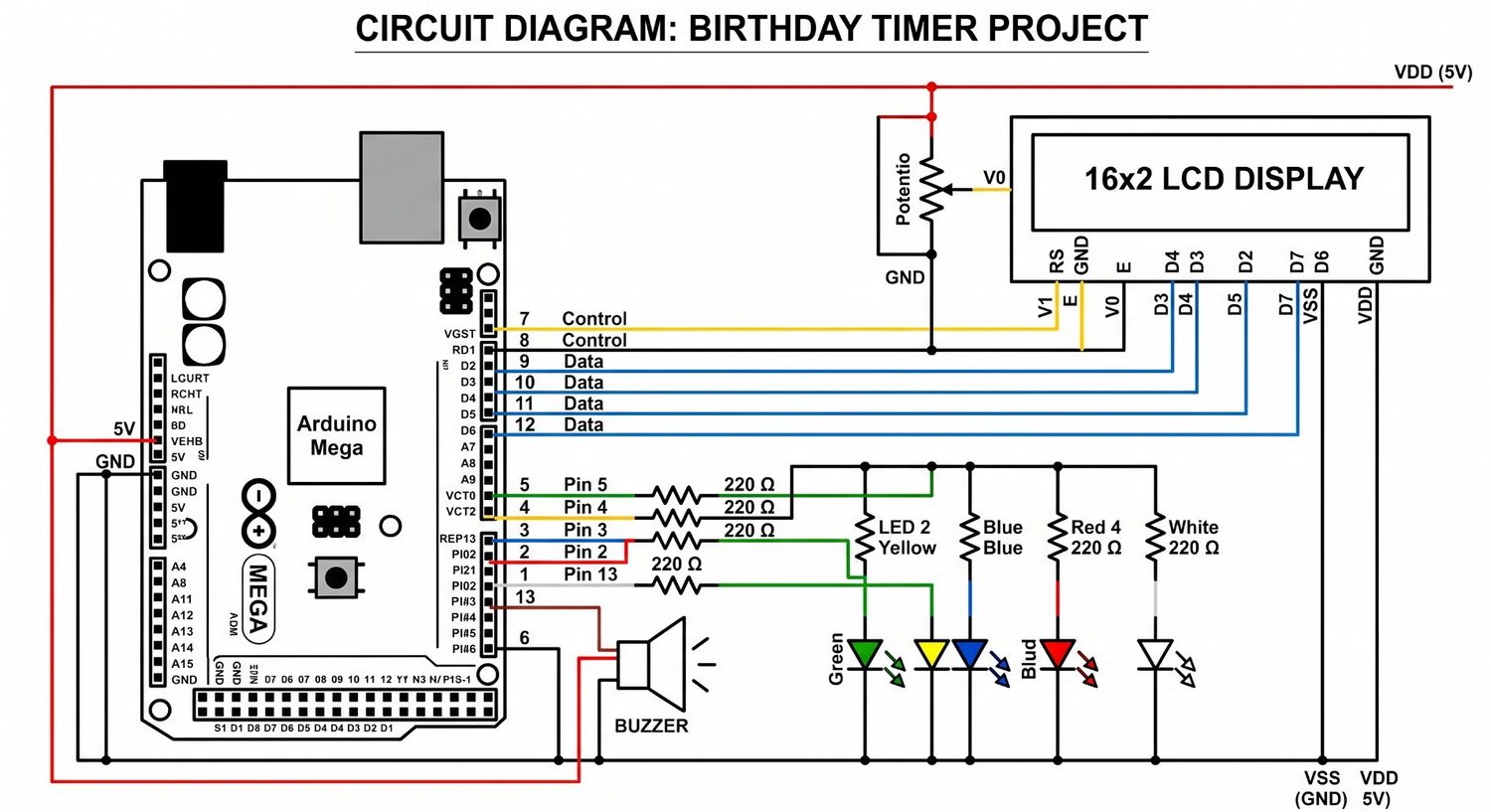
Happy Birthday song Lcd display
May 15, 2026 Watch Tutorial
Wiring Schematic
Hardware Required
- Arduino Mega
- Lcd display
Source Code
Arduino / C++
1#include <LiquidCrystal.h>
2
3// Define the LCD pins
4LiquidCrystal lcd(7, 8, 9, 10, 11, 12);
5
6// Define pin numbers
7const int buzzerPin = 6;
8// Your exact LED array: 1st(5), 2nd(4), 3rd(3), 4th(2), 5th(13)
9const int leds[] = {5, 4, 3, 2, 13};
10const int numLeds = 5;
11
12// Frequencies for musical notes (in Hz)
13#define NOTE_C4  262
14#define NOTE_D4  294
15#define NOTE_E4  330
16#define NOTE_F4  349
17#define NOTE_G4  392
18#define NOTE_A4  440
19#define NOTE_AS4 466
20#define NOTE_C5  523
21
22// The Happy Birthday melody notes
23int melody[] = {
24  NOTE_C4, NOTE_C4, NOTE_D4, NOTE_C4, NOTE_F4, NOTE_E4,
25  NOTE_C4, NOTE_C4, NOTE_D4, NOTE_C4, NOTE_G4, NOTE_F4,
26  NOTE_C4, NOTE_C4, NOTE_C5, NOTE_A4, NOTE_F4, NOTE_E4, NOTE_D4,
27  NOTE_AS4, NOTE_AS4, NOTE_A4, NOTE_F4, NOTE_G4, NOTE_F4
28};
29
30// Slow tempo base for the melody
31const int slowTempoBase = 2000;
32
33// Note durations (Fixed the rhythm so no beats are skipped)
34int noteDurations[] = {
35  8, 8, 4, 4, 4, 2,
36  8, 8, 4, 4, 4, 2,
37  8, 8, 4, 4, 4, 4, 2, // <- Fixed: Changed the last note of this line to a '2' so it holds properly!
38  8, 8, 4, 4, 4, 2
39};
40
41void setup() {
42  lcd.begin(16, 2);
43
44  // Set LED and Buzzer pins as outputs
45  pinMode(buzzerPin, OUTPUT);
46  for (int i = 0; i < numLeds; i++) {
47    pinMode(leds[i], OUTPUT);
48  }
49
50  // --- STAGE 1: The Countdown (Stops at 59) ---
51  for (int seconds = 55; seconds <= 59; seconds++) {
52    lcd.clear();
53    lcd.setCursor(0, 0);
54    lcd.print("  -- Timer --   ");
55    lcd.setCursor(0, 1);
56    lcd.print("    11:59:");
57
58    if (seconds < 10) {
59      lcd.print("0");
60    }
61    lcd.print(seconds);
62
63    digitalWrite(leds[4], HIGH);
64    tone(buzzerPin, 1000, 100);
65    delay(100);
66    digitalWrite(leds[4], LOW);
67    delay(900);
68  }
69
70  // --- STAGE 2: Midnight Animations ---
71  lcd.clear();
72  lcd.setCursor(0, 0);
73  lcd.print(" == 12:00 PM == ");
74  lcd.setCursor(0, 1);
75  lcd.print("~ It's Time! ~");
76
77  for(int i = 0; i < 10; i++) {
78    digitalWrite(leds[3], HIGH);
79    digitalWrite(leds[4], HIGH);
80    tone(buzzerPin, 1500, 50);
81    delay(50);
82    digitalWrite(leds[3], LOW);
83    digitalWrite(leds[4], LOW);
84    delay(50);
85  }
86
87  for(int sweeps = 0; sweeps < 3; sweeps++) {
88    for(int i = 0; i < numLeds; i++) {
89      digitalWrite(leds[i], HIGH);
90      delay(40);
91      digitalWrite(leds[i], LOW);
92    }
93    for(int i = numLeds - 2; i > 0; i--) {
94      digitalWrite(leds[i], HIGH);
95      delay(40);
96      digitalWrite(leds[i], LOW);
97    }
98  }
99
100  for(int blinks = 0; blinks < 5; blinks++) {
101    digitalWrite(leds[0], HIGH); digitalWrite(leds[2], HIGH); digitalWrite(leds[4], HIGH);
102    digitalWrite(leds[1], LOW); digitalWrite(leds[3], LOW);
103    delay(100);
104    digitalWrite(leds[0], LOW); digitalWrite(leds[2], LOW); digitalWrite(leds[4], LOW);
105    digitalWrite(leds[1], HIGH); digitalWrite(leds[3], HIGH);
106    delay(100);
107  }
108
109  for (int i = 0; i < numLeds; i++) {
110    digitalWrite(leds[i], LOW);
111  }
112
113  // --- STAGE 3: Happy Birthday Text & ENERGETIC Melody ---
114  lcd.clear();
115  lcd.setCursor(0, 0);
116  lcd.print("*Happy Birthday*");
117  lcd.setCursor(0, 1);
118  lcd.print("  ~ TO YOU ~  ");
119
120  int numNotes = sizeof(melody) / sizeof(melody[0]);
121
122  for (int thisNote = 0; thisNote < numNotes; thisNote++) {
123    int actualDuration = slowTempoBase / noteDurations[thisNote];
124
125    // Play the note continuously
126    tone(buzzerPin, melody[thisNote]);
127
128    // Visualizer Effect
129    if (melody[thisNote] == NOTE_C4) { digitalWrite(leds[0], HIGH); }
130    else if (melody[thisNote] == NOTE_D4) { digitalWrite(leds[1], HIGH); }
131    else if (melody[thisNote] == NOTE_E4) { digitalWrite(leds[2], HIGH); }
132    else if (melody[thisNote] == NOTE_F4) { digitalWrite(leds[3], HIGH); }
133    else { digitalWrite(leds[4], HIGH); }
134
135    if (noteDurations[thisNote] == 2) {
136       for(int i = 0; i < numLeds; i++) {
137         digitalWrite(leds[i], HIGH);
138       }
139    }
140
141    // Keep the note and LEDs on for the exact duration
142    delay(actualDuration);
143
144    // FORCE STOP the buzzer and LEDs so the next note is clean
145    for(int i = 0; i < numLeds; i++) {
146      digitalWrite(leds[i], LOW);
147    }
148    noTone(buzzerPin);
149
150    // Increased the gap slightly (from 0.30 to 0.40) to ensure identical notes don't bleed together
151    int gap = actualDuration * 0.40;
152    delay(gap);
153  }
154}
155
156void loop() {
157  // Empty loop so it plays once!
158}